
How Much Can Your YouTube Channel Really Earn?
A youtube views to money calculator helps you estimate potential earnings from your YouTube channel based on views, engagement, and other key metrics. Here’s what you need to know:
Quick Answer: How YouTube Money Calculators Work
- Input your metrics: Enter daily views, estimated CPM/RPM, and audience location
- Get instant estimates: See projected daily, monthly, and yearly earnings
- Understand the range: Earnings typically range from $0.50 to $22+ per 1,000 views depending on your niche and audience
- Plan your strategy: Use estimates to set realistic financial goals and optimize content
Wondering how much your YouTube videos could earn? You’re not alone. With billions of users and countless creator success stories, understanding your earning potential is the first step to building a profitable channel.
The reality is that YouTube earnings vary wildly. Two channels with the same view count can earn completely different amounts. A finance channel targeting viewers in the United States might earn $15 per 1,000 views, while a gaming channel with viewers in lower-tier countries might earn just $1 for the same views.
YouTube money calculators bridge this gap. They provide a realistic estimate based on industry data and your channel’s specifics. These calculators offer the financial clarity needed to decide if YouTube is worthwhile, plan content, or negotiate with sponsors.
Understanding what drives those numbers is key. Your earnings depend on factors like your content niche, where your viewers live, how engaged they are, and whether your content is advertiser-friendly. Google keeps 45% of ad revenue, leaving creators with 55%.
A youtube views to money calculator is more than a number-cruncher; it’s a strategic tool for making informed decisions about your content, niche, and monetization approach.
Understanding the Core Metrics: CPM vs. RPM
When discussing YouTube ad revenue, two acronyms dominate: CPM and RPM. Understanding their difference is crucial for creators to grasp their true earning potential.
First, let’s address YouTube’s revenue share. Creators in the YouTube Partner Program receive 55% of ad revenue, while Google keeps 45%. This split is fundamental to understanding your take-home pay. For more in-depth information about how channels generate income, check out our guide on More info about YouTube monetization.
Now, let’s break down those key metrics:
| Metric | Full Form | What it Represents | How it’s Used | Creator’s Perspective |
|---|---|---|---|---|
| CPM | Cost Per Mille (or Cost Per Thousand) | The cost an advertiser pays for 1,000 ad impressions on your video. The ‘M’ comes from the Roman numeral for 1,000. | This is what advertisers bid and pay. It’s a measure of the ad market value for your audience. | This is the gross amount generated by ads before YouTube’s cut. |
| RPM | Revenue Per Mille (or Revenue Per Thousand) | The net revenue you earn per 1,000 video views, after YouTube’s 45% cut and other deductions (like invalid ad clicks). | This is what you actually receive. It includes all monetized interactions, not just ad impressions. | This is the most realistic metric for estimating your actual YouTube earnings. |
| CPC | Cost Per Click | The cost an advertiser pays for each click on an ad displayed on your video. | Some advertisers pay per click rather than per impression. This is less common on YouTube but contributes to overall ad revenue. | If viewers click on ads, it can increase your overall ad revenue, influencing your RPM. |
Why RPM is a more realistic metric for creators
While CPM shows what advertisers pay, RPM is the creator’s key metric. It reflects your net revenue after YouTube’s 45% cut. For example, a $10 CPM might result in a $5.50 RPM. RPM also includes all revenue sources (memberships, Super Chats) per 1,000 views, offering a more holistic earnings picture.
For an official deep dive into YouTube’s revenue metrics, we recommend consulting YouTube’s official explanation of revenue metrics.
What Factors Influence Your YouTube Earnings?
Beyond CPM and RPM, many factors influence your YouTube earnings. Think of it as a recipe where each ingredient—from audience location to video topic—affects the final result.

Let’s break down the key ingredients that influence your YouTube earnings:
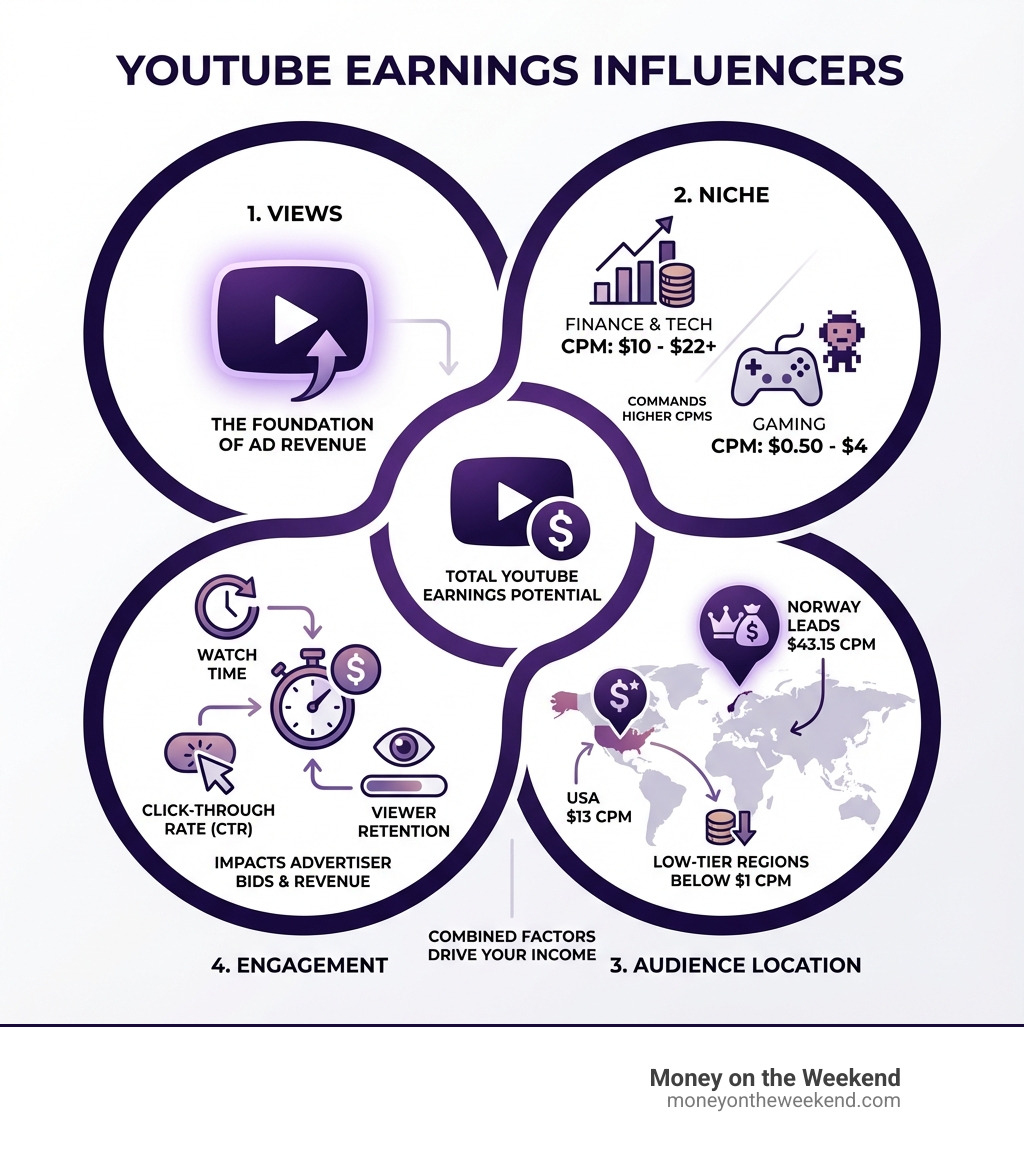
- Niche Profitability: Advertisers pay more for niches like finance, business, and tech. Viewers in these areas have higher purchasing power, making them more valuable. In contrast, broader niches like entertainment or gaming often have lower CPMs despite high viewership.
- Audience Demographics & Geographic Location: Your audience’s location is critical. Advertisers pay more to reach viewers in high-income countries like Norway, Germany, or the USA. An audience from these regions will significantly boost your RPM compared to one from lower-income areas.
- Watch Time and Engagement: Long watch times and high engagement (likes, comments, shares) signal value to YouTube’s algorithm and advertisers. This leads to higher ad bids and better RPMs, as engaged viewers are more likely to see ads.
- Content Quality: High-quality production and information attract and retain viewers, leading to better engagement, a loyal subscriber base, and higher earnings.
- Advertiser-Friendliness: Your content must be “advertiser-friendly.” Videos without profanity, violence, or controversial topics get more ads. Content flagged as unsuitable will have limited or no ads, drastically cutting your earnings. Always follow AdSense policy guidelines.
- Seasonality: Ad spending is seasonal. Advertisers spend more in Q4 (holidays) and less in other quarters. This causes your RPM to fluctuate throughout the year, even with consistent views.
- Ad Blockers: Ad blockers prevent ad impressions from generating revenue. While you can’t control their use, focusing on engagement and other income streams can mitigate the impact.
- Algorithm Changes: YouTube’s evolving algorithm can affect your video’s reach. A drop in views and ad revenue might be due to algorithm shifts. If you’re struggling with visibility, check our insights on Why your videos might not be getting views.
Realistic RPM and CPM Ranges
While every channel is unique, here are some realistic RPM ranges based on industry data:
- Finance and Business Niche: If you’re creating content about personal finance, investing, or business strategies for audiences in high-tier countries, you could see RPMs between $10 to $22+. These niches attract advertisers with deep pockets.
- Gaming and Entertainment Content: For general entertainment or gaming, your RPM might average around $0.50 to $4.00. These categories have massive viewership, but ad rates are lower due to the broader audience.
- High-CPM Countries: Some countries consistently offer higher CPMs. In 2025, Norway’s CPM was reported at $43.15, Germany at $38.85, and the USA at $13.00. Other strong contenders include Moldova ($29.50), Algeria ($24.50), Sweden ($18.18), South Korea ($17.00), Finland ($14.90), the U.K. ($13.75), and Canada ($13.50).
- Low-CPM Regions: Conversely, channels with audiences in low-tier regions may see RPMs below $1.00, reflecting the economic landscape in those areas.
These wide ranges show why a youtube views to money calculator is essential. It helps factor in these variables for a more personalized projection, as any estimate without them would be inaccurate.
How to Use a YouTube Views to Money Calculator for Strategic Planning
A youtube views to money calculator isn’t just a fun tool to play with; it’s a powerful strategic asset. For us at Money on the Weekend, we see it as a crucial step for anyone looking to build a viable online income stream. It helps us move beyond wishful thinking and into concrete planning.

Here’s how we can leverage these calculators for strategic planning:
- Setting Financial Goals: Want to earn an extra $500 a month? Or perhaps enough to go full-time as a creator? A calculator can show you how many views you’d need, given your niche and audience, to hit those targets. This helps us set realistic, achievable goals.
- Content Strategy: By understanding which niches and audience demographics yield higher RPMs, we can make informed decisions about our content strategy. Should we double down on a specific sub-niche? Are there topics that are both engaging for our audience and attractive to advertisers?
- Niche Selection: For those just starting out, a calculator can be invaluable in researching potential niches. By inputting hypothetical views and estimated RPMs for different content categories, we can gauge the financial viability of various ideas before investing significant time and effort. If you’re just starting your journey, our guide on Help starting a YouTube channel can provide a solid foundation.
- Calculating for a Single Video: Some calculators allow you to paste a video URL and estimate its earnings. This is fantastic for analyzing the performance of specific content pieces and understanding what types of videos perform best financially.
- Estimating for a Whole Channel: For an overall picture, we can input our channel’s average daily views to get a comprehensive revenue estimate. This is useful for benchmarking our performance or even for competitive research (estimating what other channels might be earning).
- Projecting Based on Daily Views: Most calculators work by letting you adjust a “daily views” slider. This helps us visualize how an increase or decrease in viewership would impact our monthly and yearly earnings, aiding in growth projections.
Step-by-Step: Using a youtube views to money calculator
Using a youtube views to money calculator is generally straightforward. While interfaces may vary slightly, the core process remains consistent:
- Find a Reliable Calculator: Several reputable tools exist online. We recommend trying a few to compare estimates, but remember they are all based on general formulas and industry averages.
- Input Your Daily Views: The first step is typically to enter the average number of daily views your YouTube videos receive. Some tools might ask for weekly or monthly views, but daily views are a common starting point.
- Set an Estimated CPM/RPM Range: This is where your research into your niche and audience demographics comes into play. Based on the realistic ranges we discussed earlier (e.g., $10-$22+ for finance, $0.50-$4.00 for gaming), you’ll set an estimated CPM or RPM. Some calculators might have a default range, while others allow you to adjust a slider. If you don’t know your exact RPM, start with a conservative estimate.
- Consider Other Factors (if available): Advanced calculators might allow you to select your audience’s primary country, your content niche, or even an estimated Click-Through Rate (CTR). The more specific information you can provide, the more refined your estimate will be.
- Calculate! Once you’ve entered your data, hit the “Calculate” button. The tool will then provide you with estimated daily, monthly, and yearly earnings.
These tools are for estimation. Your actual earnings will vary. For instance, reaching 1,000 subscribers is a significant milestone that open ups the YouTube Partner Program, but that’s just the beginning of your monetization journey. Find out more about What happens when you get 1000 subscribers on YouTube?.
Interpreting the Results from a youtube views to money calculator
Once you’ve plugged in your numbers and the youtube views to money calculator spits out its estimates, what do you do with them? This is where the real strategic thinking comes in.
- Using Estimates for Goal Setting: Don’t view the numbers as absolute truths, but rather as powerful benchmarks. If the calculator suggests you could earn $500 a month with 10,000 daily views, that gives you a concrete goal to work towards. You can then strategize how to increase your views, improve your RPM, or even use these estimates to negotiate better rates for sponsorships.
- Understanding the Wide Range of Potential Earnings: You’ll often see a range (e.g., $100-$300 per month) rather than a single figure. This wide range reflects the many variables at play, such as ad engagement, audience demographics, and content niche. It’s a reminder that YouTube earnings are rarely fixed and can fluctuate significantly.
- Combining Calculator Data with YouTube Analytics: The calculator is a fantastic starting point, but your YouTube Analytics dashboard is your source of truth. Use the calculator’s estimates to form hypotheses, then dive into your actual analytics to see how your content is truly performing. Look at your actual RPM, watch time, audience demographics, and traffic sources. This combination of external estimation and internal data provides the most accurate picture of your channel’s health and earning potential.
- Why Calculators Are Not a Guarantee of Income: We cannot stress this enough: a youtube views to money calculator provides an estimate based on industry averages and the inputs you provide. Actual earnings can vary due to real-time advertiser demand, ad blocker usage, invalid ad clicks, and even YouTube’s changing policies. Treat these tools as guides, not guarantees.
Beyond Ad Revenue: Diversifying Your YouTube Income
Relying solely on ad revenue is risky. At Money on the Weekend, we believe in diversification. A sustainable income strategy for creators involves multiple income streams.
Ad revenue is a starting point, but building a brand is key. Diversifying your income creates a resilient Content Creation business, independent of YouTube’s algorithm. This approach empowers you to find financial freedom in your spare time, aligning with our mission.
7 Powerful Monetization Methods for YouTubers
Here are seven powerful ways creators can earn money on YouTube, extending far beyond just ad impressions:
- Ad Revenue (YouTube Partner Program): The most common method. Once eligible (1,000 subscribers and 4,000 watch hours or 10 million Shorts views), you can run various ad formats on your videos.
- Affiliate Marketing: Earn commissions by promoting products you recommend. When viewers buy through your unique Affiliate Marketing link, you get a cut. This is ideal for reviews and tutorials.
- Brand Sponsorships and Deals: Brands pay you to integrate their products into your videos. Sponsorships can often earn more than ad revenue, especially for channels with engaged, niche audiences.
- Selling Merchandise: Selling branded items (t-shirts, mugs, etc.) is a lucrative stream that also strengthens your brand and community connection.
- Channel Memberships and Fan Funding: YouTube’s features like Channel Memberships, Super Chat, and Super Stickers allow your most dedicated fans to support you directly with payments for exclusive perks.
- Selling Digital Products or Courses: Leverage your expertise by creating and selling e-books, templates, or online courses, capturing more of the value you provide.
- Driving Traffic to a Blog or Business: Use your channel to market an existing business or blog. Directing viewers to your site can generate leads, sell services, or drive traffic to other monetized content.
Combining these methods creates a robust income ecosystem, reducing reliance on a single source and maximizing your earning potential.
Frequently Asked Questions about YouTube Earnings
We get many questions about YouTube earnings, a topic often shrouded in mystery. Let’s tackle the most common ones.
How many views do you need to make $1000 on YouTube?
This is a common question, but the answer is: “It depends!” There’s no magic number of views for $1,000 because RPM varies wildly.
To illustrate, let’s use some of the RPM ranges we discussed:
-
Scenario 1: Low-RPM Niche/Audience
- With an RPM of $1.00, you would need 1,000,000 views to earn $1,000.
-
Scenario 2: Mid-Range RPM Niche/Audience
- With an RPM of $4.00, you would need 250,000 views to earn $1,000.
-
Scenario 3: High-RPM Niche/Audience (e.g., Finance in the US)
- With an RPM of $20.00, you would need 50,000 views to earn $1,000.
The difference is astronomical. A high-RPM channel might need only 50,000 views to earn $1,000, while a low-RPM channel could need a million. This highlights why understanding your specific RPM is crucial.
Do subscribers directly increase your earnings?
Subscribers don’t directly increase earnings; YouTube doesn’t pay per subscriber. However, their indirect impact is huge.
Subscribers are important for several reasons:
- Higher Engagement: Subscribers are loyal fans who are more likely to watch longer, like, comment, and share. This boosts your video’s visibility and ad revenue.
- Consistent Viewership: A strong subscriber base provides a consistent stream of initial views, helping videos perform better in the algorithm and reach non-subscribers.
- Building a Community: A strong community attracts brand sponsorships and makes other monetization methods (like merchandise or memberships) more viable.
In short, subscribers are a powerful engine for growth and monetization across all income streams.
Why are my YouTube earnings decreasing?
It’s disheartening to see earnings dip despite stable views. Several factors could be at play:
- Content Seasonality: Ad spending is seasonal, with more spending in Q4 (holidays) and less in other quarters, causing your earnings to fluctuate.
- Changes in Audience Location: A shift in your audience to viewers from lower-CPM countries will decrease your overall RPM.
- Videos Becoming Less Advertiser-Friendly: YouTube may flag older or newer videos as not “advertiser-friendly,” limiting or removing ads and reducing earnings.
- Ad Blocker Usage: An increase in your audience using ad blockers will directly reduce your ad revenue.
- YouTube Rules or Algorithm Changes: Changes to YouTube’s rules or algorithm can affect your video’s reach or how many ads are shown.
- Producing Content Your Fanbase No Longer Loves: If your content style changes and disengages your core audience, watch time and views can suffer, leading to decreased earnings.
Regularly checking your YouTube Analytics can help you diagnose these issues.
Conclusion: Turn Your Views into a Viable Income Stream
At Money on the Weekend, we believe the journey to financial freedom begins with understanding your potential. A youtube views to money calculator is a powerful estimation tool, not just a novelty. It provides invaluable insights to help you set realistic goals, strategize content, and make informed decisions.
These calculators offer estimates, not guarantees. True success comes from combining these insights with a diverse monetization strategy. Relying only on ad revenue is risky; financial resilience comes from multiple income streams like sponsorships, affiliate marketing, and fan support.
Success on YouTube boils down to creating value. The more value you provide, the more engaged your community becomes, and monetization opportunities will follow.
So, take the next step. Use a youtube views to money calculator to get a clearer picture of your potential, then start building valuable content. We’re here to help you turn your passion into a viable income stream, empowering you to find financial freedom in your spare time.
Ready to dive deeper and explore all the avenues for earning on YouTube? Explore our ultimate guide to making money on YouTube and open up your full potential!