Why YouTube Partner Program Terms Matter for Your Income Goals
YouTube Partner Program terms are the legal agreements that define how you can monetize your content and earn money on YouTube. If you’re looking to turn your videos into a revenue stream, understanding these terms isn’t optional—it’s essential.
Quick Answer: The YouTube Partner Program terms include:
- Base Terms – The foundation agreement all YPP members must accept
- Watch Page Monetization Module – For earning from ads on long-form videos (55% revenue share)
- Shorts Monetization Module – For earning from Shorts Feed ads (45% revenue share)
- Commerce Product Module – For fan funding features (Super Chat, Memberships, etc.)
- Eligibility requirements – 1,000 subscribers + 4,000 watch hours OR 10 million Shorts views
- Policy compliance – Following Community Guidelines, having 2-Step Verification, and linking an AdSense account
It’s easy to feel burned out when you pour hours into filming, editing, and posting videos but don’t see a single dollar in return. Many creators hit the subscribe button on their own dreams because they don’t understand how YouTube actually pays them—or what rules they need to follow to keep earning.
The YouTube Partner Program (YPP) is your gateway to monetization. It’s how you transform a hobby into a legitimate income stream, whether you’re aiming for weekend cash or full financial freedom. But here’s the catch: YouTube recently restructured its terms into a modular system, and if you don’t accept the right modules by the deadlines, you could lose monetization entirely—even if you’ve been earning for years.
The good news? Once you understand these terms, you’ll know exactly what YouTube expects, which monetization features you can access, and how to protect your earnings. You’ll also find that YouTube now offers two entry points into the program: an “expanded” tier for fan funding (starting at just 500 subscribers in select countries) and the standard tier for ad revenue.
Decoding YPP Eligibility: Are You Ready to Earn?
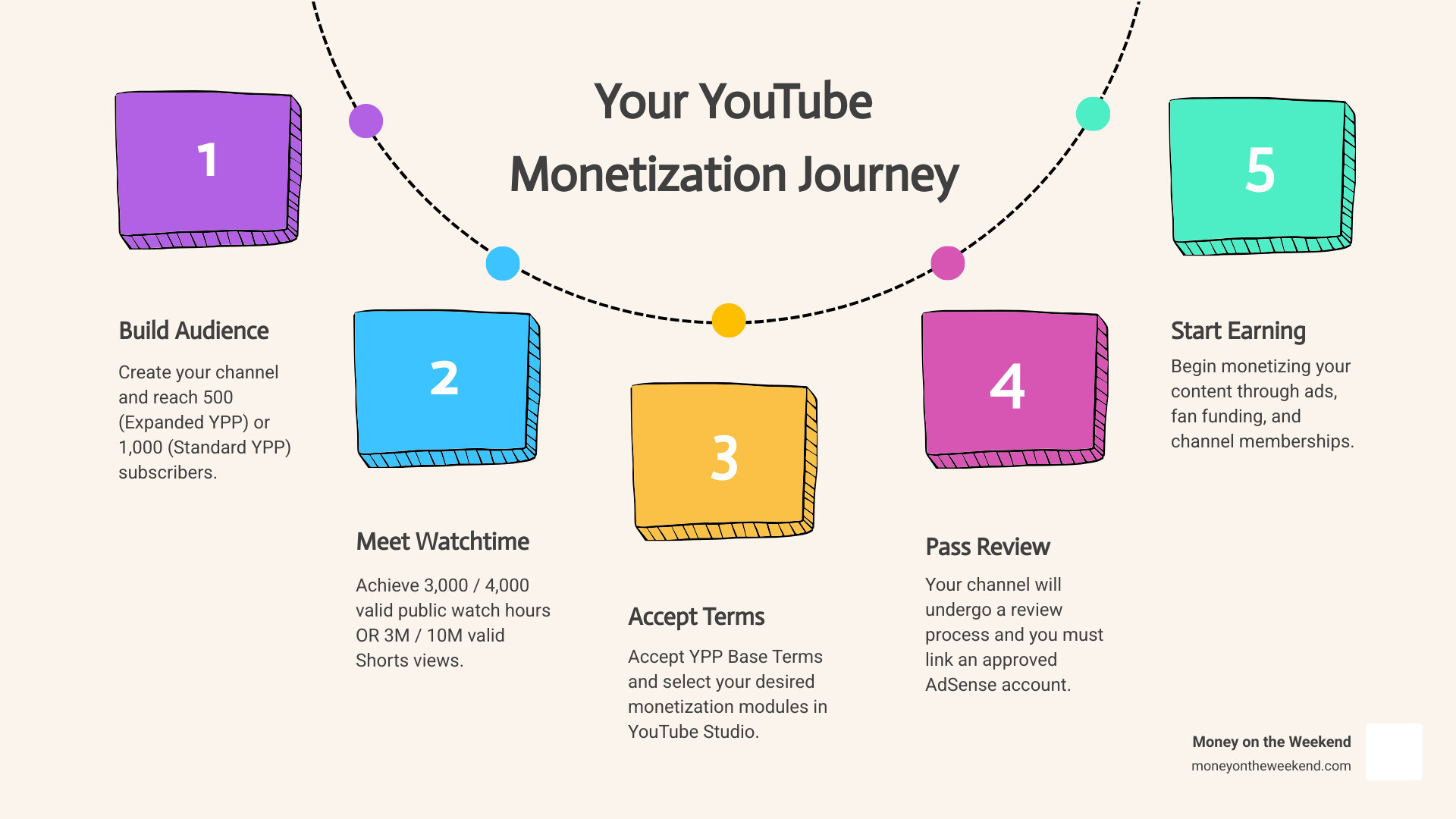
So, you’ve got a channel, you’re creating awesome content, and you’re wondering when the money starts rolling in. The first step is meeting the eligibility requirements for the YouTube Partner Program. This is where your hard work in building an audience really pays off.
At its core, the YPP is designed to support creators by allowing us to monetize our content and access valuable resources. The requirements ensure that channels are building a legitimate audience and adhering to YouTube’s standards.
The Two Tiers of YPP Access
YouTube has recently introduced a more flexible approach to YPP eligibility, offering two distinct tiers. This means you might be able to start earning from certain features even before you qualify for full ad revenue sharing.
| YPP Tier | Subscribers | Public Uploads (last 90 days) | Watch Hours (last 12 months) | Shorts Views (last 90 days) | Monetization Features | Availability |
|---|---|---|---|---|---|---|
| Expanded YPP | 500 | 3 | 3,000 | 3 million | Channel Memberships, Super Chat, Shopping | Select countries (list is expanding) |
| Standard YPP | 1,000 | N/A | 4,000 | 10 million | All Expanded YPP features + Ad Revenue (long-form & Shorts) | Countries where YPP is available |
As you can see, the “Expanded YPP” offers an earlier entry point for creators in specific regions, focusing on fan funding and shopping features. This is a fantastic opportunity if you’re keen to build a community that directly supports your work. Once you hit the higher thresholds for the “Standard YPP,” you open up the full range of monetization options, including ad revenue from both long-form videos and Shorts.
Reaching 1,000 subscribers is a significant milestone for any creator, opening doors to more than just monetization. Find more about what happens when you hit that magic number in our guide on What Happens When You Get 1000 Subscribers on YouTube?.
Foundational Requirements for All Applicants
Regardless of which tier you’re aiming for, there are some universal requirements that every channel must meet to be considered for the YouTube Partner Program. Think of these as the non-negotiables for joining YouTube’s creator club:
- Follow YouTube’s Channel Monetization Policies: These are a collection of policies and guidelines that you must adhere to. They cover everything from Community Guidelines to copyright, and compliance is non-negotiable.
- Live in an Eligible Country/Region: Unfortunately, the YPP isn’t available everywhere. You’ll need to reside in a country where the program operates. Check YouTube’s full list of countries to see if your region is included.
- No Active Community Guidelines Strikes: YouTube takes its Community Guidelines seriously. A clean record is essential. One strike might get you a warning, but multiple strikes can lead to losing your monetization privileges or even channel termination.
- Activate 2-Step Verification: This is a crucial security measure for your Google Account. It protects your channel from unauthorized access, which is vital for any earning creator.
- Have Advanced Features Access: This ensures you’re a verified and active user on the platform.
- Have an Active AdSense for YouTube Account Linked: AdSense is Google’s system for displaying ads and processing payments. It’s how you’ll get paid! You can only have one AdSense account under the same payee name, so be careful not to create duplicates. If you don’t have one, you’ll set it up or link it through YouTube Studio. We have a detailed guide on how to set up an AdSense account if you need assistance.
These foundational elements are the bedrock of your monetization journey. Without them, even the most viral content won’t bring in the dollars. If you manage multiple channels, remember each one needs to meet these requirements. For tips on managing your YouTube presence, check out How to Create Multiple YouTube Channels.
Understanding the New Modular YouTube Partner Program Terms
One of the biggest recent shifts in YouTube monetization is the introduction of modular YouTube Partner Program terms. Previously, it was a single, somewhat intimidating agreement. Now, YouTube has broken it down into more digestible pieces, giving you more control and clarity.
This modular approach means you first accept the “Base Terms,” which are the foundational agreement for all YPP participants. Then, you can choose to activate specific “Monetization Modules” based on how you want to earn. This flexibility is a game-changer, allowing creators to opt-in only to the features relevant to their content strategy. It’s YouTube’s way of making the process more transparent and adaptable for us.
For those eager to start earning, understanding this new structure is key to open uping your potential. If you’re looking for ways to speed up your earning potential, our guide on How to Start Making Money on YouTube Fast might offer some useful strategies.
To find and accept these new terms, simply head to the “Earn” section in your YouTube Studio. You’ll see prompts to review and accept the Base Terms and then choose which monetization modules you want to activate. This is also where you can check your application’s status on YouTube Studio.
The Core Monetization Modules Explained
Let’s break down the main modules you’ll encounter and what they mean for your earning potential:
- Watch Page Monetization Module: This is what most people think of when they imagine YouTube monetization. Accepting this module allows you to earn revenue from ads that appear on your long-form videos and live streams on your watch page. It also covers YouTube Premium revenue generated from these content types.
- Shorts Monetization Module: A relatively new addition, this module allows you to earn from ads that run in the Shorts Feed. This was a significant update, with Shorts ad revenue sharing beginning on February 1, 2023. If you’re creating short-form content, this module is essential for monetizing those views.
- Commerce Product Addendum (formerly Commerce Product Module): This module open ups various fan funding features, allowing your most dedicated viewers to support your channel directly. This includes:
- Channel Memberships: Offer exclusive perks (badges, emojis, member-only content) to viewers who pay a recurring monthly fee. Creators receive a generous 70% of the membership revenue after taxes and fees.
- Super Chat & Super Stickers: During live streams and Premieres, viewers can purchase Super Chat to highlight their messages or Super Stickers to send animated images, both of which appear prominently in the chat feed.
- Shopping: Promote your own products or affiliate products directly on your channel.
These modules represent the diverse ways you can achieve Monetization on YouTube, catering to different content formats and audience engagement strategies.
How Revenue Sharing Works Under the New Terms
Understanding the revenue split is crucial for planning your content strategy and income goals. YouTube’s model is designed to be fair, recognizing both the creator’s effort and the platform’s role in hosting and distributing content.
- Long-Form Video Ad Revenue: For ads shown on your long-form videos, creators receive 55% of the ad revenue, while YouTube keeps the remaining 45%. This has been the standard split for years and continues under the new terms.
- Shorts Feed Ad Revenue: This is a newer model. For ads shown between Shorts in the Shorts Feed, YouTube pools the revenue and then distributes it to creators based on their share of Shorts views. Creators receive 45% of this revenue.
- Channel Memberships: As mentioned, creators receive a substantial 70% of the membership revenue after any necessary taxes and fees are taken care of. This is a powerful way to build a loyal community and a stable income stream.
- YouTube Premium Revenue: When YouTube Premium subscribers watch your content, a portion of their subscription fee is distributed to creators. The exact share isn’t publicly detailed, but it’s another valuable income stream.
- Creator Music: YouTube is also expanding earning opportunities through Creator Music, allowing creators to use popular music in their videos while still earning revenue.
While ad revenue is often the most visible form of income, savvy creators often diversify their earnings through fan funding, brand deals, and sponsorships. To learn more about how creators diversify their income, check out How Much Do Sponsors Pay YouTubers?.
The Application and Review Process
You’ve met the requirements, you’ve understood the modular terms, and you’re ready to apply! The application process for the YouTube Partner Program is straightforward, but the review process requires patience.
To apply, you’ll go to the “Earn” section in your YouTube Studio. If you meet the eligibility thresholds, you’ll see an “Apply Now” button. The steps generally involve:
- Reviewing and accepting the Base Terms.
- Setting up or linking an AdSense for YouTube account. This is critical because it’s how you’ll get paid.
- Waiting for YouTube’s review.
Once you’ve submitted your application, your channel enters a queue for review. This process involves both automated systems and human reviewers who carefully check your content against all of YouTube’s policies and guidelines. They look at your channel’s main theme, most viewed videos, newest videos, the biggest proportion of watch time, video metadata, and your “About” section to ensure compliance.
The typical wait time for a decision is about one month, though it can sometimes be longer if there’s a high volume of applications. You can always check your application’s status on YouTube Studio to stay updated.
What to Do If Your Application is Rejected
It can be disheartening to receive a rejection, but it’s not the end of your monetization journey. Many creators get rejected on their first try, learn from it, and reapply successfully.
Common reasons for rejection often revolve around policy violations, particularly:
- Reused Content: This is content you’ve repurposed from another online source without adding significant original commentary, substantive modifications, or educational/entertainment value. Think clips of shows with no narrative, or compilations from other social media without substantial change.
- Inauthentic Content (formerly Repetitious Content): This refers to mass-produced or repetitive content that uses a template with little variation, or content that’s easily replicable at scale.
- Community Guideline Violations: Any content that violates YouTube’s rules on hate speech, nudity, harassment, etc., will lead to rejection.
If your application is rejected, YouTube will usually provide a general reason. Your best course of action is to:
- Review YouTube’s Policies: Go back through the YouTube channel monetization policies and Community Guidelines with a fine-tooth comb.
- Audit Your Content: Identify and remove or edit any videos that might be in violation. Focus on adding value, originality, and ensuring your content is advertiser-friendly. Sometimes, a video that isn’t getting views might also be the one causing policy issues. Learn more about why your content might not be performing in Why aren’t my YouTube videos getting views?.
- Appeal or Reapply:
- You can appeal the decision within 21 days if you believe it was a mistake.
- If you don’t appeal, or your appeal is unsuccessful, you can reapply after a 30-day period for your first rejection.
- For subsequent rejections, you’ll need to wait 90 days before reapplying. Use this time wisely to improve your channel.
Key Differences in the Updated YouTube Partner Program Terms
The recent updates to the YouTube Partner Program terms represent a significant evolution. Here’s a quick recap of the key differences:
- Modular Contracts: Instead of one giant agreement, you now have Base Terms and optional Monetization Modules. This offers more clarity and flexibility.
- Separate Acceptance for Shorts: The Shorts Monetization Module is a new and distinct agreement, specifically for earning from ads in the Shorts Feed. This reflects YouTube’s commitment to short-form content.
- Expanded Early Access: The introduction of the “Expanded YPP” tier allows creators to access fan funding and shopping features at lower subscriber and watch time/Shorts view thresholds in select countries.
- Deadlines for Existing Partners: Existing YPP members were given a deadline (July 10, 2023) to accept the new terms. Failure to do so could result in removal from the program.
- MCN and CMS Partners: Channels affiliated with Multi-Channel Networks (MCNs) or using a Content Management System (CMS) have specific requirements, often needing their MCN or managing entity to accept the Monetization Amendment and potentially the Shorts Monetization Module.
Staying Compliant and Keeping Your Monetization
Getting into the YPP is a fantastic achievement, but staying in and maintaining your monetization requires ongoing vigilance and adherence to YouTube’s rules. It’s not a “set it and forget it” situation.
Here are key aspects to keep in mind:
- Channel Inactivity: YouTube wants to support active creators. If your channel hasn’t uploaded a video or posted to the “Posts” tab for 6 months or more, YouTube may turn off your monetization. Keep those creative juices flowing!
- Ad-Friendly Content Guidelines: Even if your content follows Community Guidelines, it also needs to be “advertiser-friendly.” This means avoiding sensitive topics, strong language, or controversial themes that advertisers might not want their ads associated with.
- Copyright Compliance: Respecting copyright is paramount. The Copyright Match Tool is available to YPP members, scanning for full reuploads of your content. Using licensed music (or royalty-free) is crucial to avoid strikes and ensure your videos are eligible for monetization.
- Invalid Traffic and Financial Fraud: YouTube has strict policies against artificially inflating engagement (views, subscribers, likes, watch time) or engaging in deceptive transactions. This is considered “non-qualifying revenue.” If financial fraud or invalid traffic is detected, YouTube may withhold, adjust, charge back, or offset earnings from your AdSense account. This isn’t a new policy but is clarified in the updated terms.
Continuously reviewing and understanding the YouTube channel monetization policies is your best defense against losing your earning capabilities.
Consequences of Not Accepting the Updated YouTube Partner Program Terms
The updated YouTube Partner Program terms included a crucial deadline (July 10, 2023) for existing partners to accept the new Base Terms. For those who didn’t, or for new creators who refuse to accept them, the consequences are clear:
- Removal from YPP: Your channel will be removed from the YouTube Partner Program. This means you will no longer have access to any monetization features.
- Loss of Monetization: You will stop earning revenue from ads on your long-form videos, Shorts, and fan funding features like Channel Memberships, Super Chat, and Super Stickers.
- Inability to Earn from Ads: While YouTube reserves the right to serve ads on all content, if you’re not in the YPP, you won’t receive a share of that revenue. So, ads might still appear on your videos, but your wallet won’t feel any fatter.
- Re-applying to the Program: If you’re removed, you’ll need to re-meet all eligibility requirements and reapply from scratch, following the same application and review process as a new channel.
Essentially, not accepting the Base Terms means you’re no longer considered a partner. All use of the service is subject to the general YouTube Terms of Service, but without the YPP agreement, there’s no revenue sharing.
Frequently Asked Questions about YPP Terms
We know navigating the intricacies of YouTube’s monetization can spark a lot of questions. Here are some common queries we often hear:
What happens if my subscriber or watch hour count drops after I join the YPP?
Don’t panic! YouTube generally doesn’t remove monetization immediately for small, temporary dips below the eligibility thresholds once you’ve been accepted into the YPP. However, you’re expected to maintain good standing and continue to adhere to all policies. If your channel experiences a prolonged decline in engagement or repeated policy violations, YouTube may suspend or terminate your participation in the program. The key is to stay active and compliant.
Can I monetize my old videos after being accepted into the YPP?
Absolutely! Once your channel is accepted into the YouTube Partner Program and you’ve activated the relevant monetization modules, you can enable ads and other monetization features on both your new uploads and your existing, eligible videos. This means your back catalog can become a new source of income, contributing to your passive income goals.
Do I need to accept all monetization modules to be in the YPP?
No, you don’t. The Base Terms are mandatory for all YPP participants. However, the other monetization modules (Watch Page Monetization, Shorts Monetization, Commerce Product Addendum) are optional. You only need to accept the modules that correspond to the monetization features you wish to use. For example, if you only want to earn from long-form video ads and fan funding, you wouldn’t need to accept the Shorts Monetization Module. This modular approach provides flexibility, allowing you to tailor your monetization strategy.
Conclusion
Understanding the YouTube Partner Program terms is more than just reading legal jargon; it’s about equipping yourself with the knowledge to thrive as a digital entrepreneur. From the two tiers of eligibility to the new modular contract system and the intricacies of revenue sharing, every piece of information helps you build a sustainable income stream.
We’ve explored how YouTube reviews applications, what to do if you face a rejection, and the critical importance of ongoing compliance to maintain your monetization. By staying informed, creating original, advertiser-friendly content, and actively engaging with your audience, you’re not just building a channel—you’re building a business.
At Money on the Weekend, we believe in empowering you to find financial freedom through online income generation. The YouTube Partner Program is a powerful vehicle for this, turning your passion into profit.
Start your journey to earning passive income on YouTube today!