Why Animation on YouTube is Your Creative Launchpad to Income
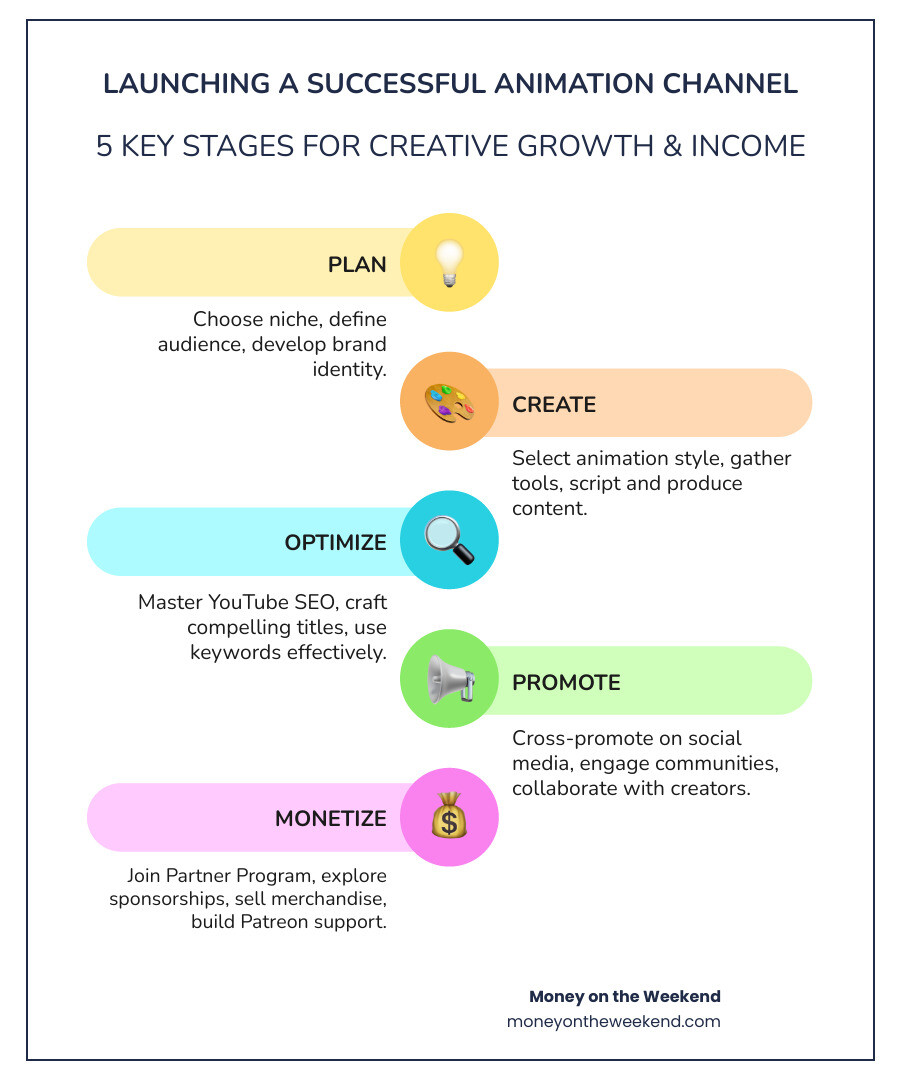
Learning how to start an animation channel on YouTube is a journey that blends creativity with strategy. It involves finding your niche, setting up a branded channel, choosing a sustainable animation style, creating consistent content, optimizing for search, and monetizing your work.
Here’s the quick roadmap:
- Choose your niche – storytime, educational, comedy, or gaming
- Set up your channel – create account, add branding, write description
- Pick your animation style – 2D, 3D, motion graphics, or simple sketches
- Create content – script stories, animate, record voiceover
- Optimize for findy – use keywords in titles, descriptions, and tags
- Promote consistently – share on social media, engage with viewers
- Monetize – join YouTube Partner Program, explore Patreon, sell merch
Starting an animation channel can feel daunting. You might worry about the time investment or whether anyone will watch. But the reality is that YouTube has 2.5 billion monthly users, and animation videos can deliver a 68% better return on investment than other content. The platform offers a massive audience and a living portfolio that can attract clients.
The best part? You don’t need expensive gear or years of experience. Many top animators started with simple tools and authentic stories. This guide provides the exact steps to turn your passion project into a reliable income stream, from finding your niche to earning your first dollar.
Laying the Foundation: From Niche to Channel Setup
Before you draw a single frame, building a strong foundation is crucial for long-term success. This initial planning helps you avoid common beginner mistakes and sets the stage for growth.
Why YouTube is the Perfect Stage for Your Animations
YouTube is more than a video-hosting site; it’s a global content hub. With 2.5 billion monthly users and one billion hours of video watched daily, it offers a limitless audience. As the world’s second-largest search engine, people are actively looking for content like yours. For animators, it’s a level playing field where simple animation with great ideas can thrive. Your channel becomes a living portfolio that can attract clients and collaborators, allowing you to build a brand and earn an income. For more insights, Get Creator Tips for why you should create videos.
Finding Your Niche and Unique Voice
To stand out, you need a niche—a specific area that you’re passionate about and that isn’t overly crowded. Consider what you love: are you a storyteller? Storytime animation might be for you. Great at breaking down complex topics? Try educational content. If you love quick laughs, a comedy series could be your calling. It’s also vital to define your target audience. Study successful channels in your desired niche to see what resonates with viewers. Your unique artistic angle—be it your humor, drawing style, or storytelling—is what will make your channel memorable.
Building Your Brand Identity
Your brand identity is your channel’s personality. Start with a creative and memorable channel name that hints at your content. Design a memorable logo and professional banner art to create a strong first impression; tools like Canva can help. A short channel trailer is also a great way to hook new viewers. Most importantly, establish a consistent art style. This includes your character designs, color palettes, and overall visual language. A consistent look builds recognition and trust with your audience. This Guide on character art style consistency offers great examples.
The Technical Setup: Creating and Verifying Your Channel
Getting your channel live is straightforward. First, you’ll need a Google Account to access YouTube. When setting up your channel, choose a Brand Account for greater flexibility, especially if you plan to collaborate with others later. Next, customize your channel by adding your logo, banner art, and a video watermark. Write a detailed channel description using keywords that explain your content. Finally, verify your channel with a phone number. This open ups crucial features like custom thumbnails, live streaming, and the ability to upload videos longer than 15 minutes. For more details, Read more about channel basics.
The Creative Core: Content Production and Workflow
With your channel set up, it’s time to create. A well-planned content strategy and an efficient production pipeline are essential for consistently delivering high-quality animations. Mastering the balance between quality and quantity is a skill every successful animator develops.

Choosing Your Animation Style
Your animation style defines your channel’s identity and workflow. When learning how to start an animation channel, it’s crucial to pick a style you can realistically maintain. Options include:
- 2D Animation: Versatile, ranging from traditional frame-by-frame to simpler rig-based animation. Popular software includes Adobe Animate, Toon Boom Harmony, and the free OpenToonz.
- 3D Animation: Offers incredible depth but has a steeper learning curve. The free software Blender is a powerful starting point.
- Stop Motion: A time-consuming but charming style that brings physical objects to life.
- Motion Graphics: Ideal for explainer videos and dynamic titles, often created with Adobe After Effects.
- Whiteboard Animation: A popular style for educational content that simplifies complex ideas.
- Virtual YouTubers (Vtubers): Uses animated avatars that track your movements, great for live streaming.
A simple 5-8 minute video can take a solo animator weeks to complete. Choose a style that supports your storytelling without causing burnout. Simple styles can be highly effective.
Essential Tools and Software for Every Budget
You don’t need to break the bank to start. Many successful creators began with low-cost resources. Here are the essentials:
- Animation Software: Free options like OpenToonz (2D) and Blender (3D) are excellent. For iPad users, Procreate is a powerful tool.
- Drawing Tablets: A game-changer for digital art. Wacom, Huion, and XP-Pen offer models for all budgets.
- Quality Microphones: Clear audio is crucial for viewer retention. A good USB microphone is a worthwhile first investment.
- Video Editing Software: DaVinci Resolve is a powerful free option. iMovie (Mac) is also a great starting point.
- Cameras/Smartphones: Your smartphone is often sufficient for stop motion or recording reference footage.
Start with what you have and upgrade as your channel grows. YouTube offers more advice here: Get Creator Tips for video equipment.
From Idea to Script: Crafting Compelling Stories
A great story is the heart of any successful animation. Turn your ideas into structured narratives that captivate your audience.
Start by brainstorming ideas from personal experiences, daily life, or popular trends. Use tools like TubeBuddy or VidIQ to research trending topics in your niche. The scriptwriting process is crucial; a 10-minute video requires about 1500 words. Write in a conversational tone, as if talking to a friend.
- Structure your narrative: Use frameworks like the three-act structure (beginning, middle, end) to build a solid story.
- Sound natural: Your voiceover should be engaging and authentic. This builds trust with your audience.
- Write for retention: Structure your script to grab and hold attention. Pacing, pauses, and music can improve emotional and humorous beats.
- Use humor and emotion: The best channels make viewers laugh and feel. A mix of witty gags and vulnerable moments creates a relatable experience that keeps people coming back.
How to Start an Animation Channel and Grow an Audience
Creating great content is only half the journey. To build a thriving community, you need to understand how YouTube works, get your videos finded, and engage with your audience.
Mastering YouTube SEO for Animators
YouTube is a search engine. To get your animations seen, you need to use Search Engine Optimization (SEO). This means making your videos findable for people already looking for your type of content.
Start with keyword research using tools like TubeBuddy or VidIQ to see what terms people are searching for. Then, incorporate these keywords into:
- Compelling Titles: Your title should include keywords and spark curiosity without being clickbait.
- Keyword-Rich Descriptions: Use the 5000-character limit to describe your video, add context, and link to your social media.
- Relevant Tags: Use a mix of broad and specific tags to help YouTube categorize your video.
- Click-Worthy Thumbnails: Your thumbnail is often the first thing a viewer sees. It must be eye-catching, clear, and accurately represent your video. A good thumbnail and title are vital for a high click-through rate (CTR), which signals to YouTube that your content is engaging.
Promotion and Distribution Beyond the Upload Button
Don’t stop at the upload button. Share your work far and wide to maximize its reach.
- Cross-promote on social media: Short clips and teasers perform well on TikTok and Instagram Reels, driving viewers to your full YouTube videos.
- Share in online communities: Post your work on relevant subreddits or forums, but always respect community rules.
- Join animator communities: A Discord server like this one, Joining a Discord community of animators, is a goldmine for feedback, support, and collaboration.
- Collaborate with other creators: Working with other YouTubers in your niche introduces your channel to a new, relevant audience.
The Power of Consistency and Audience Engagement
Consistency is key to long-term YouTube success. The algorithm favors regular uploads, and your audience will appreciate a predictable schedule.
Create a content calendar to plan your videos, whether it’s weekly, bi-weekly, or monthly. However, never sacrifice quality for quantity. A well-made video is always better than rushed content. Engage with your audience by responding to comments, asking for feedback, and building a loyal community through a Discord server or live Q&As. Finally, use YouTube Analytics to understand your audience. This data helps you see who is watching, for how long, and what content performs best, allowing you to refine your strategy. For more guidance, check out these YouTube analytics tips.
Leveraging YouTube Shorts and Live Streams
YouTube Shorts and Live Streams are powerful tools for growth and engagement.
YouTube Shorts (vertical videos under 60 seconds) are perfect for teasers, short gags, or behind-the-scenes clips. They can go viral quickly and attract a flood of new subscribers.
Live Streaming offers a direct, real-time connection with your audience. Use it for Q&As, live drawing sessions, or just to hang out with your community. Both formats help you diversify your content, reach new audiences, and strengthen your relationship with your fans.
Turning Your Passion into Profit: Monetization and Scaling
Now for the exciting part: turning your creative passion into a sustainable income. At Money on the Weekend, we focus on achieving financial freedom through digital entrepreneurship, and animation channels offer powerful opportunities. Animation videos can deliver up to a 68% better return on investment than other content, making your skills highly valuable.
Viable Monetization Strategies for Animators
Once you have a consistent audience, you can explore multiple income streams:
- YouTube Partner Program: The most common starting point. You need 1,000 subscribers and 4,000 watch hours to qualify. Once in, you earn AdSense revenue from ads on your videos.
- Direct Fan Support: Channel Memberships and Super Chat allow your most dedicated fans to support you directly with monthly fees or highlighted messages during live streams.
- Affiliate Marketing: Recommend the tools you use (software, tablets, mics) and earn a commission when viewers purchase through your links. Authenticity is key.
- Selling Merchandise: Turn your characters and art into t-shirts, mugs, or prints. This generates income and turns fans into brand ambassadors.
- Brand Sponsorships: As your channel grows, companies may pay you to feature their products. Always be transparent with your audience.
- Fan-Funding Platforms: Patreon allows fans to support you with monthly donations in exchange for exclusive content or perks.
- Freelance Work: Your channel is a powerful portfolio. Clients can find your work and hire you for custom animation projects.
Diversifying your income streams by combining these methods creates financial stability and creative freedom.
How to start an animation channel that scales: Growing Your Team
Most creators start solo, but as you grow, scaling becomes necessary to avoid burnout and tackle bigger projects. The Pencilmation channel, for example, grew to a team of over 100 people.
Know when to scale by identifying your bottlenecks. Are you overwhelmed by scripting or editing? These are signs you need help. Start by outsourcing specific tasks to freelancers. You could hire an animator for in-betweening, a writer for scripts, or an editor for post-production. This frees you up to focus on the creative direction.
As you build a team, foster a collaborative culture with clear communication. Use project management tools like Kitsu for team workflow to manage tasks efficiently. Developing standard processes and style guides will protect your channel’s quality and unique voice as you grow. Scaling allows you to increase output, take on more ambitious projects, and evolve from a solo creator to a creative director.
Frequently Asked Questions about Starting an Animation Channel
It’s natural to have questions before diving in. Here are answers to some of the most common concerns for aspiring animators learning how to start an animation channel.
How much time does it take to produce one animated YouTube video?
There’s no single answer, as production time varies greatly. It depends on the complexity of your animation style, the video’s length, and your personal skill level. A simple 5-8 minute video created by a solo animator can take anywhere from a few days to several weeks. The key is to find a sustainable workflow that prevents burnout while allowing you to produce content consistently.
Do I need expensive equipment to start?
Absolutely not. You can start with minimal investment. Your smartphone is great for recording voiceovers, and there are excellent free animation and editing programs like OpenToonz and Blender. While a professional drawing tablet is nice, an affordable basic tablet is more than enough to begin. If you do invest, prioritize a quality microphone, as clear audio is crucial for viewer retention. You can upgrade your gear as your channel grows and generates income.
How do I find ideas for my animated videos?
Inspiration is everywhere. The best ideas often come from a place of authenticity.
- Draw from personal life experiences: Your unique stories—funny, quirky, or vulnerable—are highly relatable.
- Observe popular trends: Put your animated spin on a trending topic or meme.
- Cover your passions: Your enthusiasm for a topic, whether it’s gaming or science, will shine through and engage your audience.
- Ask your audience: Involve your community by asking for suggestions in comments or polls. They often have brilliant ideas.
- Analyze successful channels: Study what works in your niche (without copying) and find your own unique angle.
Conclusion
Now you have the roadmap for how to start an animation channel. We’ve covered everything from finding your niche and setting up your channel to creating content, growing an audience, and turning your passion into profit.
Animation is a marathon, not a sprint. Success doesn’t happen overnight. It comes from starting, showing up consistently, and improving with every video you create. The potential for both creative and financial fulfillment is massive on a platform with 2.5 billion users.
At Money on the Weekend, we’re dedicated to helping creators like you find financial freedom. Your animation skills are a valuable asset that can generate passive income and attract incredible opportunities. The hardest part is getting started.
So take that first step. Sketch a character, write a script, and hit publish. Your creative journey awaits.